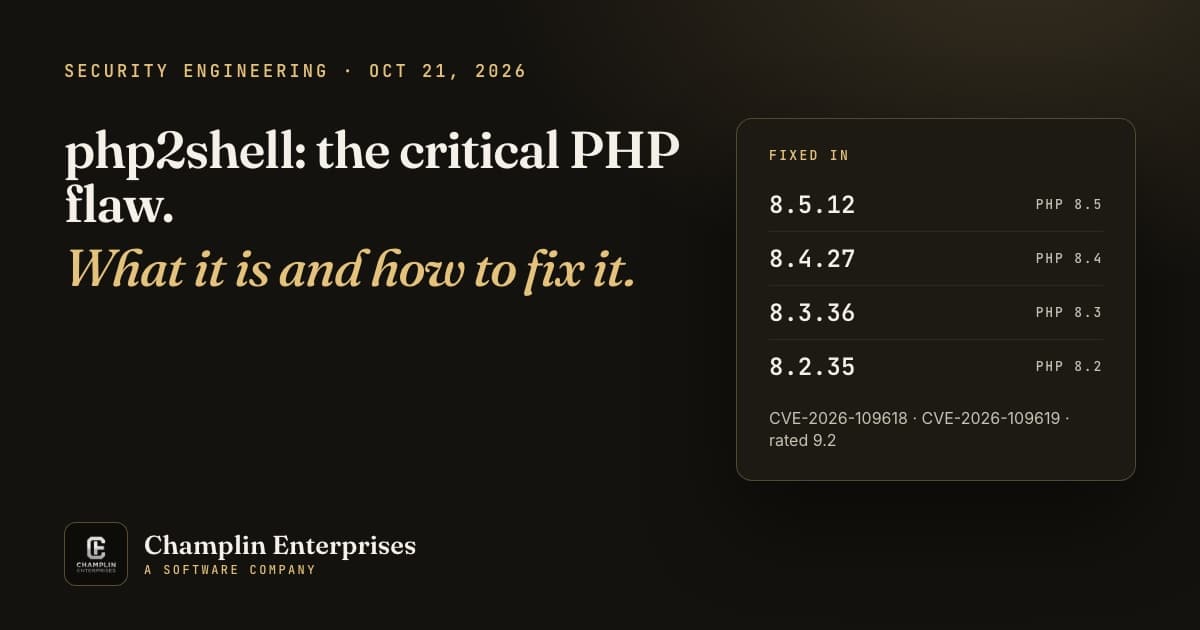
php2shell is the nickname for two critical PHP vulnerabilities, CVE-2026-109618 and CVE-2026-109619, that can let an anonymous visitor run code on a web server. PHP runs WordPress, Laravel, WooCommerce and a large share of the web, so if you have a website, this one is worth ten minutes of your time today.
The PHP project released fixed versions on October 21, 2026, and rates both flaws Critical, 9.2 out of 10 (CVSS v4.0). Below is what the flaws are, how to tell whether your site is affected, how to fix it properly, and what to do if you cannot update yet.
- What php2shell Is, in Plain English
- Are You Affected?
- How to Fix It
- If You Cannot Update Today
- Check That You Were Not Hit
- What We Did for Our Clients
What php2shell Is, in Plain English
Both bugs live inside PHP itself, not in WordPress or a plugin. That is what makes them serious: keeping plugins up to date does not protect you, and the attack can start before your application code runs at all.
- CVE-2026-109618, “RCE via OOM corruption”: when PHP runs out of memory at the wrong moment, it can be interrupted while internal request data is only half set up. The cleanup step then treats that broken data as valid. An attacker can force this with a specially built request.
- CVE-2026-109619, “RCE via stale global state”: some internal state from one request can outlive the memory behind it. A later request handled by the same PHP worker can then use that stale state before it is reset.
The key facts, from the PHP security advisory:
- No login needed. The flaws can allow unauthenticated remote code execution.
- Every common setup is in scope: PHP-FPM, Apache with mod_php, php-cgi, FrankenPHP and LiteSpeed. The PHP team considers the risk highest for mod_php, where it has a demonstrated exploit.
- It is being used. Datadog Security Labs reported multiple cases of active exploitation in the wild as of October 21, along with broad, untargeted scanning.
Are You Affected?
If your site runs PHP and has not been updated to one of the fixed versions below (or a vendor-patched build), assume yes. The fixed versions are:
| PHP branch | Fixed in | Status |
|---|---|---|
| 8.5 | 8.5.12 | Supported |
| 8.4 | 8.4.27 | Supported |
| 8.3 | 8.3.36 | Supported |
| 8.2 | 8.2.35 | Security fixes until December 31, 2026 |
| 8.1, 8.0, 7.4 | No official release | End of life. Source backports exist; your vendor may package them |
| 7.3 and older | None | Upgrade to a supported version |
How to check your version on WordPress: go to Tools, Site Health, Info, open the Server section and read “PHP version”. Your hosting control panel (cPanel, Plesk) shows it too.
Two traps catch people here:
- Check the PHP that serves your site, not the command line. Running
php -von a server often reports a different PHP than the one your website uses. Site Health or your host panel shows the right one. - Vendor packages keep their own version numbers. Ubuntu, Debian, Red Hat and hosting panels such as Plesk often patch an older version without changing the number you see. A site on “8.1.34” can be patched, and a number alone does not prove it either way. Check your vendor’s advisory or the package build date.
How to Fix It
There is one complete fix: update PHP. The PHP team is direct about it: “There are no complete mitigations, updating is the only safe choice.”
- Update to a fixed version: 8.5.12, 8.4.27, 8.3.36 or 8.2.35, or your vendor’s patched package for your branch. Linux distributions and long-term support vendors received the patches in advance, so check your vendor for updated packages.
- Restart everything that runs PHP. Installing a patch does not change a process that is already running. Restart PHP-FPM or Apache, and also any long-running PHP processes: queue workers, Laravel Horizon, websocket servers, schedulers. These are easy to miss, and they keep running the old, vulnerable code until they restart. On Linux,
readlink /proc/*/exe | grep "php.*(deleted)"(run as root) lists processes still running a replaced PHP binary. It will not catch PHP loaded inside Apache as mod_php, so when in doubt, simply restart Apache or PHP-FPM and every worker. - Confirm it took. Reload Site Health (or your panel) and check the version or build date. Then load your site, submit a form and log in to the admin to make sure nothing broke.
- If you are on shared or managed hosting, you usually cannot update PHP yourself. Ask your host, in writing, whether your site is on a patched build and whether PHP was restarted afterward.
- If you are on PHP 8.1 or older, this is the push to upgrade. The PHP security team published minimal source backports for 7.4, 8.0 and 8.1, which some vendors package, but there is no fix for 7.3 and older.
If You Cannot Update Today
The PHP advisory lists stopgaps that reduce exposure to specific attack paths. They do not make a server safe (each one blocks only the known attack paths, not every variant), so treat them as a bridge to the update, not a substitute.
- For CVE-2026-109618: set
memory_limit=-1in a way applications cannot override (for examplephp_admin_valuein the FPM pool or Apache config), and pair it with a container or cgroup memory limit. Set a lowpost_max_size(8M if you do not take uploads, 32M if you do) withupload_max_filesizebelow it. Enforce request size and field-count limits at your web server or proxy, including for requests with no Content-Length. Do not useRLIMIT_ASorRLIMIT_DATA; they can trigger the very failure you are trying to avoid. - For CVE-2026-109619: set
session.upload_progress.enabled=0inphp.inior the FPM pool config, then restart every worker. On PHP 8.5, also setfatal_error_backtraces=0. Settings made throughini_set()or.user.inido not count, and hiding errors withdisplay_errorsor@does not help.
Check That You Were Not Hit
Patching closes the door; it does not tell you whether someone walked through it first. Datadog’s write-up covers detection in depth. The signals worth checking:
- Odd form submissions in your access or WAF logs: unusually long form field names, or control characters in submitted data.
- Memory exhaustion errors with no file or line in your PHP error log, such as “Allowed memory size of … bytes exhausted … in Unknown on line 0”. Memory errors alone do not prove an attack, so look for them alongside oversized POST requests.
- Worker crashes, such as segmentation faults in your Apache or PHP-FPM error log. A failed exploit attempt can crash the worker.
- A web server process starting a shell (
sh,bash) or other commands it has no reason to run. - New or changed PHP files you did not put there, especially in upload folders.
No single signal is conclusive, and a successful attack may leave no error at all. If you find a shell started by your web server, PHP files you did not add, or several of these signals together, treat the server as compromised: take a backup for evidence, rotate passwords and keys, and get help before you rebuild.
What We Did for Our Clients
For every website we host, we updated PHP to the patched builds on October 21, the day the fixes came out. We then restarted every PHP process, including the background workers that a normal restart misses, and confirmed that nothing was still running the old code.
We also checked our server logs for the attack signs above and found none. Our hosting clients did not have to do anything, open a ticket or know any of this was happening. That is the point of having someone watch over your site.
Need Help With This?
If you are not sure which PHP version your site runs, your host has not answered, or you would simply rather hand this off, we can help. We check your site, patch or coordinate the update with your host, confirm it is done, and look for signs of compromise.
If you want this kind of response every time without having to think about it, our managed hosting and care plan covers it: $79 a month for hosting and care, with daily backups and round-the-clock monitoring included. For a one-time check, get in touch and tell us your site address.
Sources: PHP security advisory (October 21, 2026), GitHub advisories GHSA-w8hw-w9fx-j79w and GHSA-6wmf-4rv5-p3rp, and Datadog Security Labs.