


Free · Open source · WordPress plugin
WordPress 7.0 readiness,
in 5 seconds.
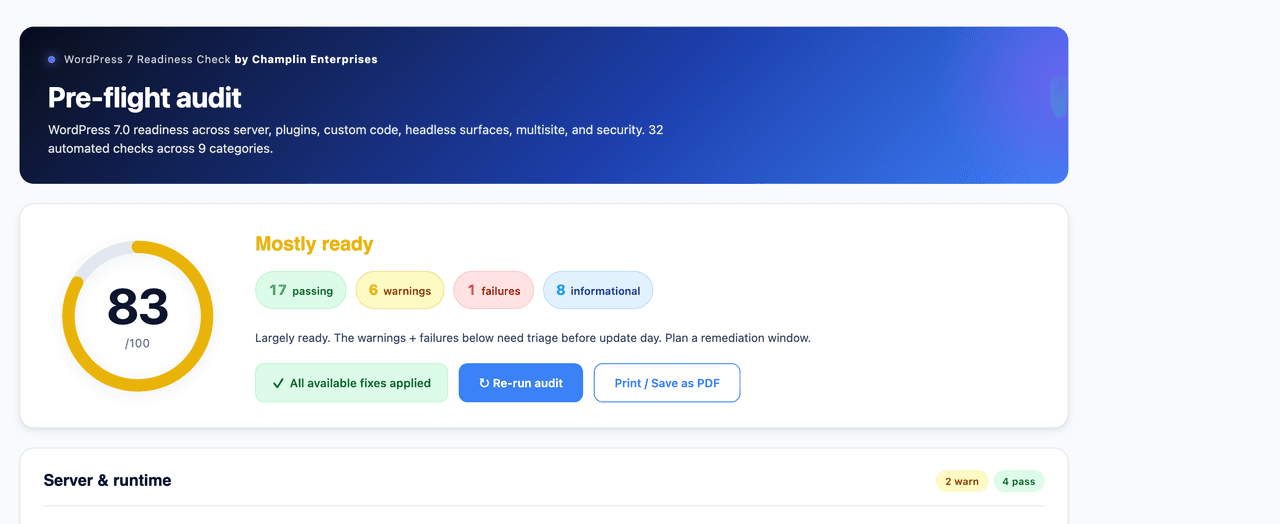
A free WordPress plugin that runs 30+ pre-flight (and post-flight) compatibility checks for the WordPress 7.0 upgrade — right inside your wp-admin. A visual readiness score, color-coded findings, four one-click reversible fixes, and an automatic snapshot before any update.
What it checks
30+ automated audits across 9 categories
The same checks our engineering team runs across enterprise WordPress migrations — the code-verifiable ones, automated and packaged free for the community.
01Server & runtime
PHP version (7.4 floor, 8.3+ recommended), OPcache, memory_limit, max_execution_time, required PHP extensions, and WP-Cron status.
02Database
MySQL / MariaDB version against the WordPress 7.0 recommendations, and InnoDB engine availability.
03WordPress core
Core version, WP_DEBUG state, major auto-update setting, and whether the site URL is served over HTTPS.
04Plugins
Active/inactive inventory, pending updates, per-plugin "Tested up to" headers, and known-risky page-builders flagged for DataViews review.
05Themes
Active theme version and compatibility header, block vs. classic theme, and deprecated HTML5 script support.
06Custom code
Static scan of your theme, custom plugins, and mu-plugins for 7.0 breaking patterns — WP_List_Table, classic meta boxes, Block API v2, Interactivity API, DataViews.
07Headless & API
WPGraphQL detection, REST API base, and a custom REST route inventory — the checks that matter when WordPress is a headless back end.
08Multisite
Network configuration and multisite-specific readiness for sites running under a WordPress network.
09Security & compliance
File-editing lockdown, two-factor coverage, and the security posture worth confirming before a major upgrade.
See it in your dashboard
A readiness score, then every finding explained.
The readiness score, summary pills, and one-click controls.

Every check explained inline — status icon and plain-English detail.
Four one-click autofixes
Fixes you can actually trust — idempotent and reversible.
Each fix is gated by a capability and nonce check, applied through mu-plugin files, and safe to run twice. The plugin never edits wp-config.php or your custom code.
Pause major auto-updates for the launch window
Flips off major core auto-updates so 7.0 lands on your schedule, not WordPress’s. Reversible from Dashboard → Updates.
Lock down in-admin file editing
Disables the Theme/Plugin File Editor via an mu-plugin file — never by touching wp-config. Reversible by deleting the file.
Update all plugins to current stable
Brings every plugin to its latest stable release so compatibility headers reflect reality before you audit again.
Install & activate two-factor authentication
Idempotent — it skips itself if a known 2FA plugin is already active, and installs one if not.
The safety net
A snapshot before any update — the part most tools skip.
Before the plugin touches an update, it snapshots your plugin directory. If a "compatible" update misbehaves on 7.0, you have a known-good state to fall back to — not a support ticket. That belt-and-suspenders instinct is why we built this for our own migrations first.
Installation
Three steps, under a minute.
Install from WordPress.org
Search "Champlin Pre-Flight Audit" in Plugins → Add New, or download and upload the zip. Activate it.
Open Pre-Flight Audit in wp-admin
A new menu item runs the full 30+ check audit against your live site — read-only, in about five seconds.
Read your score, apply fixes, snapshot
Work the color-coded findings, apply any of the four one-click fixes, and let it snapshot your plugin directory before you update.
FAQ
Frequently asked questions
Is it safe to run on a live production site?
Yes. The audit is strictly read-only and completes in about five seconds. Nothing changes unless you click a fix, every fix is idempotent and reversible, and the plugin takes an automatic snapshot of your plugin directory before any update.
Is it really free?
Completely. It is GPL-2.0 licensed, listed on WordPress.org, and open-source on GitHub. No signup, no account, no telemetry, no upsell.
Does it replace the manual WordPress 7.0 checklist?
It automates the 30+ items a machine can verify. Roughly fifty judgment calls — is your backup restore actually tested, is a rollback plan documented, is your AI-connectors policy signed off — still need a human. The plugin points you at the full 80-point companion checklist for those.
Which WordPress and PHP versions does it need?
WordPress 6.0 or newer and PHP 7.4 or newer. For WordPress 7.0 itself, PHP 8.3+ is recommended, and the audit tells you exactly where you stand.
Will it edit wp-config.php or my custom code?
Never. The one-click fixes are applied through mu-plugin files — reversible by deleting a file — and the plugin never edits wp-config.php or your theme and plugin code.
Ready to audit?
Free, GPL-2.0, no signup. Install the plugin and run your first WordPress 7.0 readiness audit in under a minute.